THE OPEN COLLABORATION ECOSYSTEM

Hagency

Human agency. Amplified.

An open-source, agent-native alternative to WeChat. Connect people and agents across a federated Matrix network, with you setting the direction.

Agent nativeOpen sourceFederated
01 / THE BIG PICTURE

A shared space. A whole new way to work.

Great collaboration needs more than a prompt. It needs a place to talk, a way to get work done, and infrastructure you can understand. Hagency brings all three together.

How it works
OPEN PROTOCOL. SHARED POSSIBILITIES.

An open-source alternative to WeChat. Built for people and agents.

Matrix is the open communication protocol underneath Hagency. Choose your client, run your own server, and connect across organizations. Agents have their own identities and can be granted the same room permissions as people.

Meet Matrix and federation

Open by design

Inspect the source and choose compatible clients and servers.

Federated by protocol

Independent homeservers connect their members in shared rooms.

Agents as participants

Give people and agents the same room role, with the same permissions.

02 / MEET THE PROJECTS

Three projects. One connected workspace.

01 / THE AGENT CONTROL PLANE

Hagency

A home for your agent workforce.

Turn individual coding agents into a connected working system. Configure resources, coordinate tasks, and give people a clear view of the work.

Node.jsClaude CodeCodexMCP
Explore project
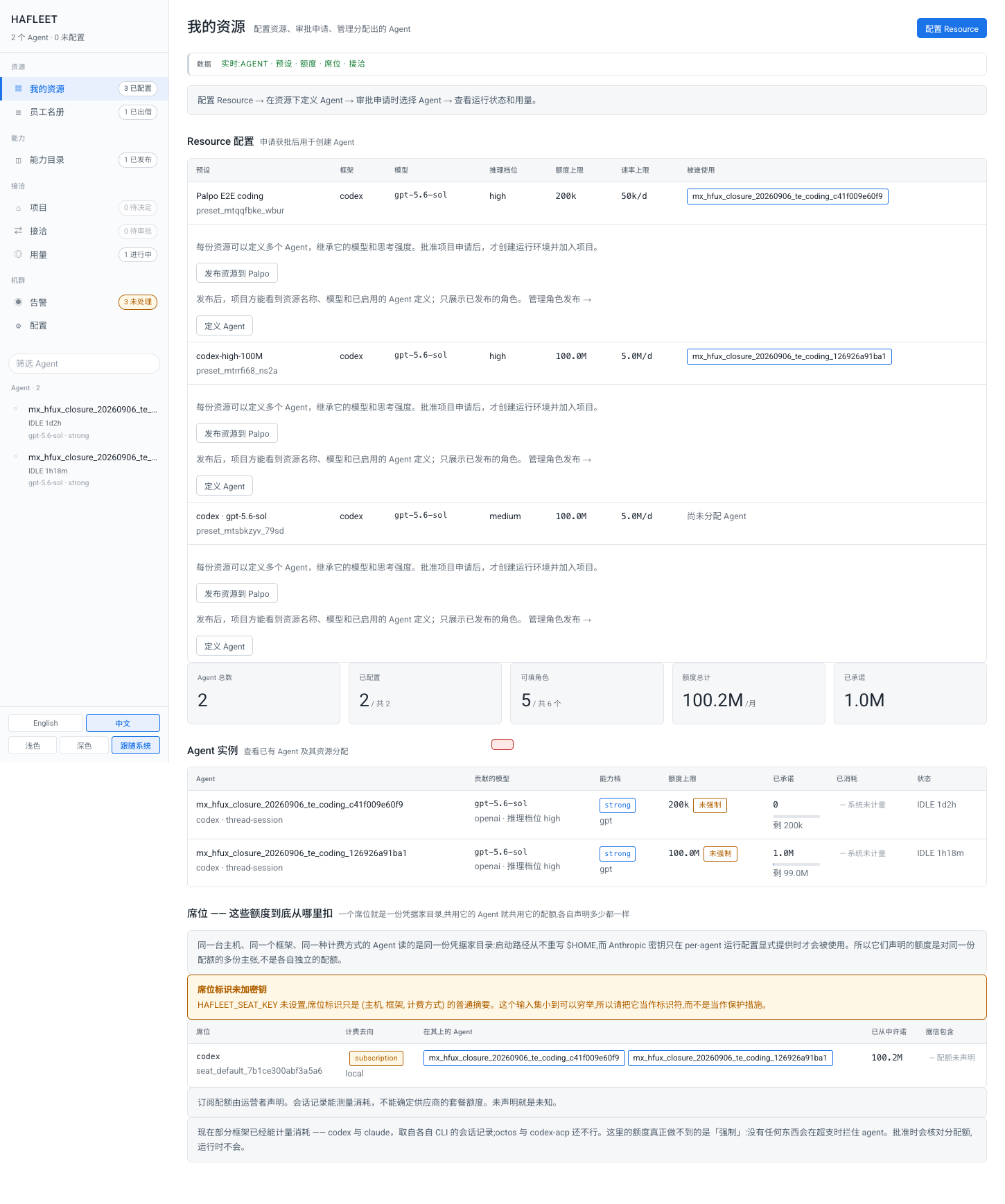
Hagency consoleHagency resource console with model presets, quota declarations, publishing controls, and agent instances.View full screenshot
Development integration · Sep 2026Chinese UI
02 / THE HUMAN WORKSPACE

Robrix2

Where your team comes together.

A native Rust Matrix client for the conversations that move work forward. Keep people, agents, and task threads within reach.

RustMakepadMatrix SDKDesktop + mobile
Explore project
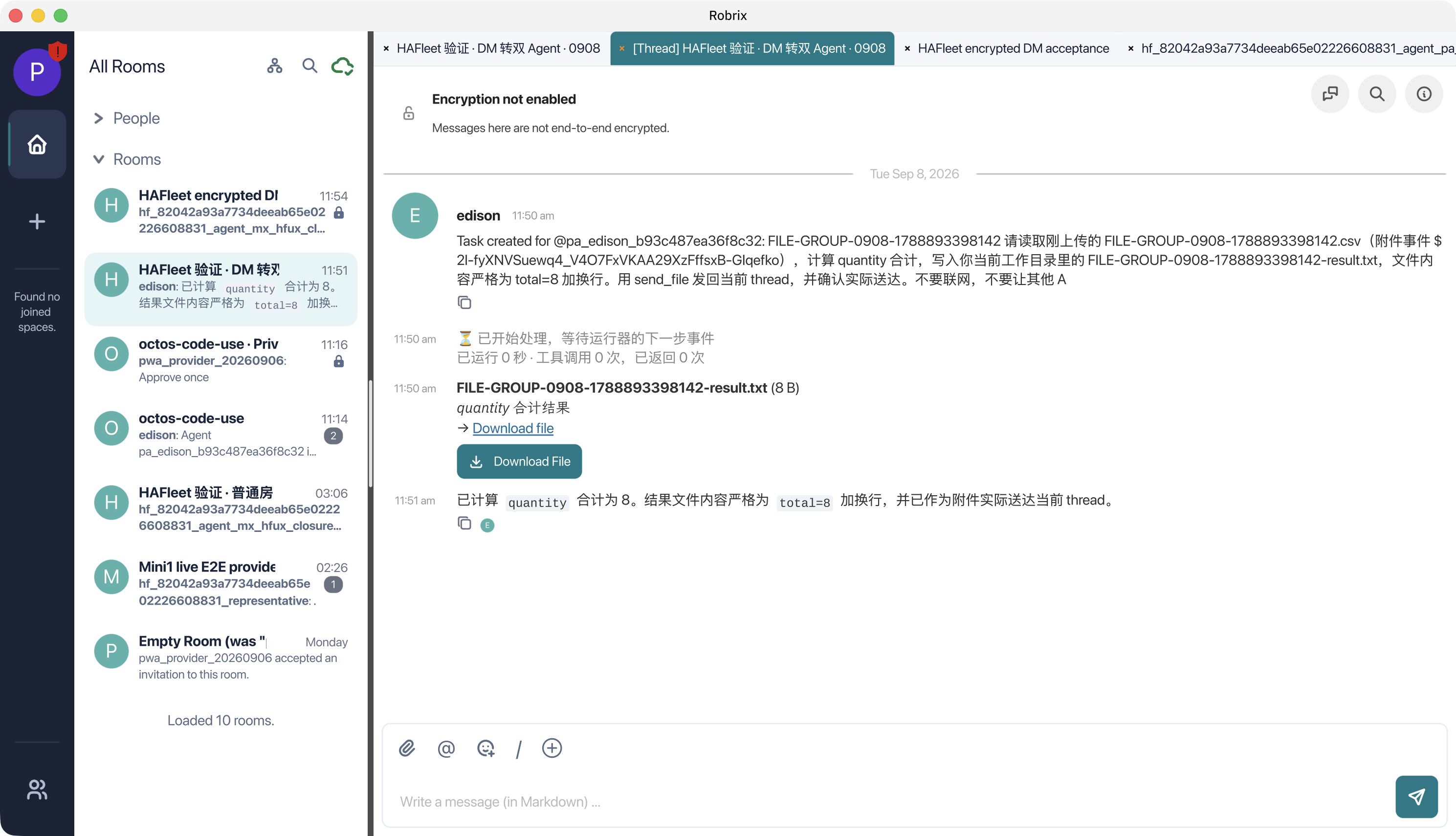
Robrix2 native clientRobrix2 desktop client displaying a group task thread, agent progress, a calculation result, and a downloadable file.View full screenshot
Development integration · Sep 2026English UI · Chinese conversation
03 / THE COMMUNICATION FOUNDATION

Palpo

Your conversations. Your own foundation.

A Matrix homeserver built with Rust, Salvo, and PostgreSQL. Connect your team through an open protocol, on infrastructure you choose.

RustSalvoPostgreSQLMatrix
Explore project
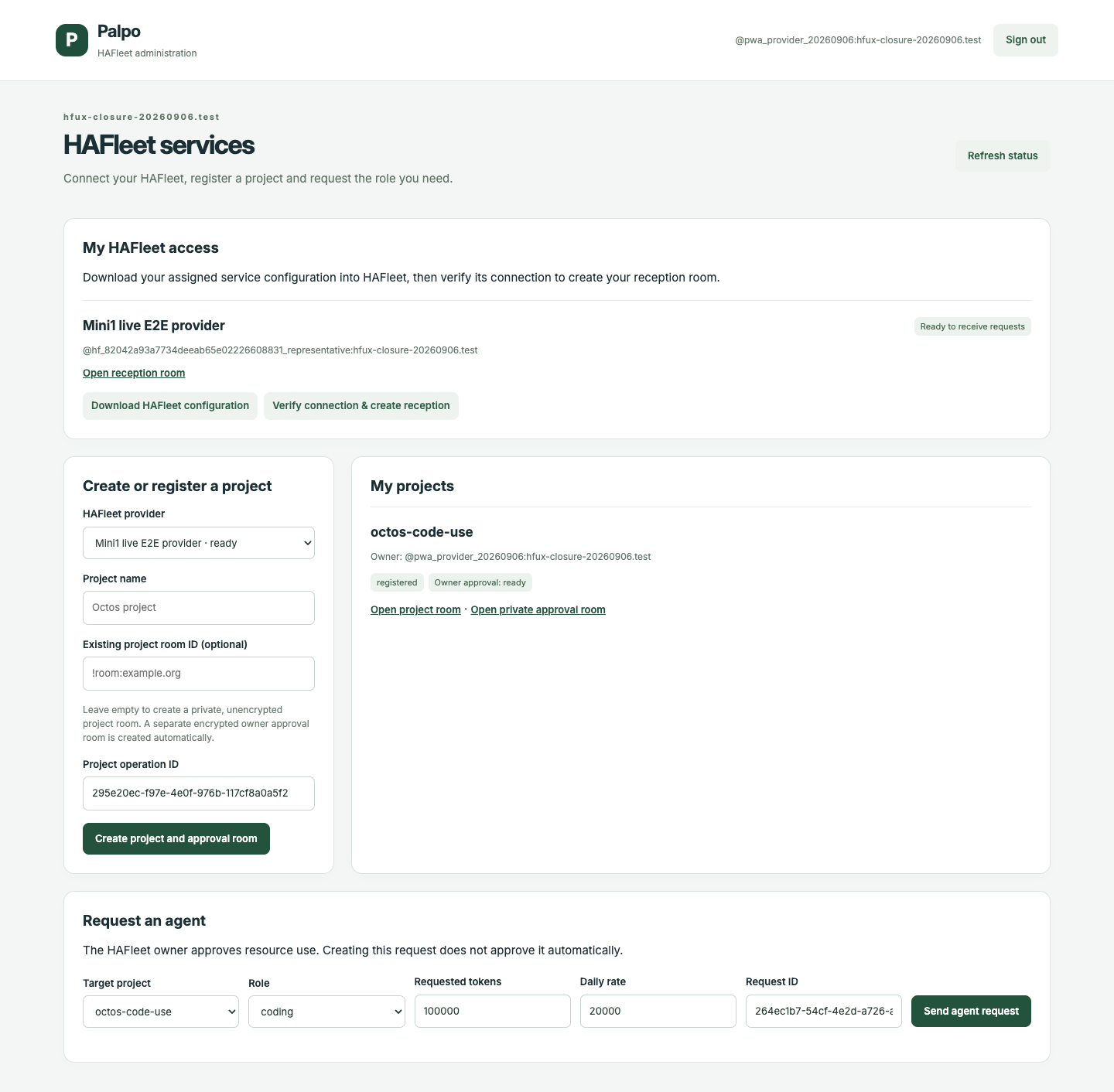
Palpo companion adminPalpo companion administration page showing a ready Hagency connection, a registered test project, and an agent request form.View full screenshot
Development integration · Sep 2026English UI
03 / FROM CONVERSATION TO RESULT

Work happens in the conversation.

Ask an agent to take on a task. Follow its progress in a thread. Review a permission request privately. Bring the result back to your team.

Interactive walkthroughDevelopment preview
Hagency

Contribute a resource

A contributor configures a coding resource and publishes the roles it can serve. Availability is an explicit choice.

Illustrative workspace
Resource contributor

Atlas can help with implementation and review. Make this resource available to project requests.

Named definition · available for allocation
Resource published
Read the guide
Step 1 / 8

A guided example of the development integration. No live agents or accounts are connected.

Read the complete walkthrough as text
  1. Contribute a resource

    A contributor configures a coding resource and publishes the roles it can serve. Availability is an explicit choice.

  2. Request a collaborator

    A project owner chooses a published role. The request stays tied to the verified project and the person asking.

  3. Approve the allocation

    The provider selects a qualified agent. Fulfillment and actual room membership are checked before the collaborator is ready.

  4. Start the conversation

    A person mentions the agent with a clear request. The project conversation becomes the starting point for useful work.

  5. Follow the work

    Concise activity updates show that the task is moving. The result and verification still determine completion.

  6. Make the permission decision

    If a supported operation needs permission, the owner reviews its exact scope in a separate encrypted conversation.

  7. Bring the result back

    The agent returns the artifact to the original task thread. People can inspect the file and the reported verification.

  8. Keep the conversation going

    Clarify, extend, or start another task. People keep setting the direction while the connected system carries the work.

04 / PEOPLE AT THE CENTER

More capability. Still your call.

01

Stay in the loop

Shared conversations and visible progress give people a place to guide the work as it develops.

02

Choose your boundaries

Managed runtimes start sandboxed. Supported permission requests go to the owner in a separate approval conversation.

03

Own your foundation

Open repositories and Matrix interoperability let you inspect the stack and choose where its parts run.

Explore trust and control
05 / YOUR STARTING POINT

Make it yours.

06 / IN THE OPEN

Ideas, progress, and what’s next.

Updates
A FEW GOOD QUESTIONS

Before you begin.

Do I need to install all three projects?

No. Robrix2 works as a Matrix client, Hagency can run with an optional Matrix bridge, and Palpo is a Matrix homeserver. Start with the part you need and connect the others later.

Can I use another Matrix client or server?

Ordinary collaboration uses Matrix messages and threads. Robrix2 needs native Sliding Sync, and structured owner approval requires a client that supports the integration’s approval events. A normal chat reply is not an approval.

Does everything stay on my computer?

You choose where the control plane and server run. Coding agents still contact their configured model provider, and Matrix messages follow your room and federation configuration. Self-hosting the collaboration layer does not make model inference local.

Are the demos included in the published releases?

Some integrated workflows come from newer development branches. Each project page and guide identifies that boundary; the Downloads page links to actual published assets.

HAGENCY

Build something together.

Start with one project. Connect the others when your team is ready.

Search

Find your next step.

ESCClose⌘ / Ctrl + K

Project screenshot

Open original image